Android将图片上传到PHP服务器,并通过调用MySql数据显示图片 PHP处理上传数据,图像数据保存到MySQL
将字节数组转换为Base64编码字符串
使用HTTP POST请求将Base64编码字符串发送到PHP服务器端
在服务器端,使用PHP解码Base64字符串并将其保存为文件
使用MySQLi模块连接到MySQL数据库
进行需要的数据库操作
1
2
3
4
5
6
7
8
9
10
11
12
13
14
15
16
17
18
19
20
21
22
23
24
25
26
27
28
29
30
31
32
33
34
<?php $json = file_get_contents ('php://input' );$data = json_decode ($json , true );$user = $data ['user' ];$image = $data ['image' ];$base64_string = $image ;$image_data = base64_decode ($base64_string );$image_name = uniqid () . '.png' ;file_put_contents ('uploads/avatar/' . $image_name , $image_data );$servername = "localhost" ;$username = "root" ;$password = "123456" ;$dbname = "mydatabase" ;$conn = new mysqli ($servername , $username , $password , $dbname );$sql = " UPDATE users SET avatar = 'uploads/avatar/$image_name ' WHERE user = '$user ' " ;$conn ->query ($sql );echo "更新数据库成功" ;$conn ->close ();?>
另一种上传图像的方法[没有尝试过] 1 2 3 4 5 6 7 8 9 10 11 12 13 14 15 16 17 18 val imageByteArray: ByteArray = val base64String = Base64.encodeToString(imageByteArray, Base64.DEFAULT)val url = URL("" )val conn = url.openConnection() as HttpURLConnection"POST" true val os = conn.outputStreamif (conn.responseCode == HttpURLConnection.HTTP_OK) {else {
另一种检索图像的方法[没有尝试过,将BASE64直接存储,很占空间],解码为 Bitmap //get_image.php 文件需要从数据库中检索 Base64 字符串,作为响应发送回客户端
1 2 3 4 5 6 7 8 9 10 11 12 13 14 15 16 17 18 19 val url = URL("get_image.php" )val conn = url.openConnection() as HttpURLConnection"GET" val inputStream = conn.inputStreamval encodedImage = inputStream.bufferedReader().use { it.readText() }val decodedImage = Base64.decode(encodedImage, Base64.DEFAULT)val bitmap = BitmapFactory.decodeByteArray(decodedImage, 0 , decodedImage.size)val imageView = findViewById(R.id.image_view)
基于 PHP 服务器的文件上传和保存 1 2 3 4 5 6 7 8 9 10 11 12 13 14 15 16 17 18 19 20 21 22 23 24 25 26 27 28 29 30 31 32 33 34 35 <?php if (isset ($_FILES ["fileToUpload" ])) {$filename = $_FILES ["fileToUpload" ]["name" ];$filesize = $_FILES ["fileToUpload" ]["size" ];$filetype = $_FILES ["fileToUpload" ]["type" ];$filecontent = file_get_contents ($_FILES ["fileToUpload" ]["tmp_name" ]);$servername = "SERVER" ;$username = "ROOT" ;$password = "" ;$dbname = "DATA" ;$conn = new mysqli ($servername , $username , $password , $dbname );$sql = "INSERT INTO files (filename, filesize, filetype, filecontent) VALUES (?, ?, ?, ?)" ;$stmt = $conn ->prepare ($sql );$stmt ->bind_param ("siss" , $filename , $filesize , $filetype , $filecontent );$stmt ->execute ();$fileId = $stmt ->insert_id;$response = array ("fileId" => $fileId ,"filename" => $filename ,"filesize" => $filesize ,"filetype" => $filetype ,"createdAt" => date ("Y-m-d H:i:s" )header ("Content-Type: application/json" );echo json_encode ($response );exit ();?>
Android中使用Kotlin进行图片的BASE64编码和解码 1 2 3 4 5 6 7 8 9 10 11 12 13 14 15 16 17 18 19 20 21 22 import android.graphics.Bitmapimport android.graphics.BitmapFactoryimport android.util.Base64import java.io.ByteArrayOutputStreamfun encodeBitmapToBase64 (bitmap: Bitmap ) val outputStream = ByteArrayOutputStream()100 , outputStream)val byteArray = outputStream.toByteArray()return Base64.encodeToString(byteArray, Base64.DEFAULT)fun decodeBase64ToBitmap (base64String: String ) val decodedByteArray = Base64.decode(base64String, Base64.DEFAULT)return BitmapFactory.decodeByteArray(decodedByteArray, 0 , decodedByteArray.size)
bitmap.compress(Bitmap.CompressFormat.PNG, 100, outputStream)
第二个参数用于指定压缩质量的参数,它在压缩PNG格式的图片时并没有实际意义[PNG格式是一种无损压缩格式,压缩质量参数的值并不会影响压缩后图片的清晰度和质量]。因此,无论将这个参数设置为多少,生成的PNG图片的质量都是一样的。
但为了确保图片在转换为PNG格式时不会丢失任何信息,通常会将这个参数的值设置为100。在压缩其他格式的图片时,这个参数的值就会起到实际的作用,用于指定压缩质量。如:压缩JPEG格式的图片时,这个参数的值越高,生成的压缩后的图片质量越好,对应文件大小越大。
Base64.encodeToString(byteArray, Base64.DEFAULT)
第二个参数指定了编码方式。
Base64.DEFAULT:默认值,使用标准的Base64编码方式进行编码。编码后的字符串会被分成若干行,每行长度为76个字符,每行末尾会添加一个换行符。Base64.NO_PADDING:不进行填充操作,也就是说编码后的字符串长度不一定是4的倍数。Base64.NO_WRAP:编码后的字符串不进行换行操作,也就是说所有的字符都在一行上。Base64.URL_SAFE:使用URL和文件名安全的Base64编码方式进行编码。在这种编码方式中,字符+和/被替换为-和_,而且编码后的字符串不进行换行操作。
BitmapFactory.decodeByteArray(decodedByteArray, 0, decodedByteArray.size)
decodedByteArray是包含BASE64解码后的字节数组,这个数组是从输入的BASE64字符串中解码得到的。BitmapFactory.decodeByteArray()是一个静态方法,它可以将一个字节数组解码为一个Bitmap对象。该方法接收三个参数:
第一个参数是要解码的字节数组。
第二个参数是解码的偏移量,通常设置为0,表示从字节数组的起始位置开始解码。
第三个参数是解码的长度,通常设置为字节数组的长度,表示解码整个字节数组。
注:解码过程发生了错误或者字节数组无法被正确解码为一个Bitmap对象,该方法会返回null
ImageView 获取 Bitmap 图像 要从 ImageView 获取 Bitmap 图像,可以使用以下代码:
1 2 val imageView: ImageView = findViewById(R.id.imageView)val bitmap = (imageView.drawable as BitmapDrawable).bitmap
首先获取 ImageView 对象,然后使用 drawable 属性获取 ImageView 的 Drawable 对象。由于这里使用的是 BitmapDrawable,因此可以将其转换为 Bitmap 对象并将其分配给一个变量。
val bitmap = (imageView.drawable as BitmapDrawable).bitmap分析:
获取 ImageView 中显示的 Bitmap 对象。
使用 imageView.drawable 属性获取 ImageView 的 Drawable 对象。
将其转换为 BitmapDrawable 对象,这是一个可以将 Drawable 转换为 Bitmap 的特殊类型。使用 as 操作符可以将 Drawable 对象转换为 BitmapDrawable 对象
获得 BitmapDrawable 对象后使用 bitmap 属性获取其中的 Bitmap 对象,这是 BitmapDrawable 中存储 Bitmap 的位置。
注意:代码假定 ImageView 中显示的 Drawable 对象是 BitmapDrawable,如果 ImageView 中显示的是其他类型的 Drawable 对象,如 ShapeDrawable、GradientDrawable 或 VectorDrawable,那么将无法将其转换为 BitmapDrawable。
设置图片转为Bitmap类型的
1 bd.imageView.setImageBitmap(BitmapFactory.decodeResource(resources,R.drawable.a))
完整代码
1 2 3 4 5 6 7 8 9 10 11 12 13 14 15 16 17 18 19 20 21 22 23 24 25 26 27 28 29 30 31 CoroutineScope(Dispatchers.IO).launch {var bitmap = (imageView.drawable as BitmapDrawable).bitmap var pic_base : String = encodeBitmapToBase(bitmap)val url = URL("http://172.19.136.160/postpic.php" )val connection = url.openConnection() as HttpURLConnection"POST" true "Content-Type" , "application/json" )var image: String = pic_baseval jsonObject = JSONObject()"user" , user)"image" , image)val outputWriter = OutputStreamWriter(connection.outputStream)val responseCode = connection.responseCodeif (responseCode == HttpURLConnection.HTTP_OK) {val inputStream = connection.inputStreamval bufferedReader = BufferedReader(InputStreamReader(inputStream))val response = StringBuilder()var inputLine: String?while (bufferedReader.readLine().also { inputLine = it } != null ) {"MainActivity" , "Response received: $response " )
将 Bitmap 显示在 ImageView 上 1 2 3 val imageView: ImageView = findViewById(R.id.imageView)val bitmap: Bitmap = ...
实现代码:
1 2 3 4 5 6 7 8 9 10 11 12 13 14 15 16 17 18 19 20 21 22 23 24 25 26 27 28 29 30 31 32 33 34 35 Thread {val url = URL("http://192.168.56.1/getpic.php" )val connection = url.openConnection() as HttpURLConnection"POST" true "Content-Type" , "application/json" )var id : Int 1 val jsonObject = JSONObject()"id" , id)val outputWriter = OutputStreamWriter(connection.outputStream)val responseCode = connection.responseCodeif (responseCode == HttpURLConnection.HTTP_OK) {val inputStream = connection.inputStreamval bufferedReader = BufferedReader(InputStreamReader(inputStream))val response = StringBuilder()var inputLine: String?while (bufferedReader.readLine().also { inputLine = it } != null ) {"MainActivity" , "Response received: $response " )val jsonResponse = JSONObject(response.toString())val pic_base24 = jsonResponse.getString("pic_base24" )val imageView: ImageView = bd.imageViewval bitmap: Bitmap = encodeBaseToBitmap(pic_base24)
注:最后的imageView.setImageBitmap(bitmap)可能因为不在主线程报错,用Handle类,或者协程解决
1 2 3 4 withContext(Dispatchers.Main){val bitmap: Bitmap = encodeBaseToBitmap(pic_base24)
结果展示: POST 1 2 3 4 5 6 7 8 9 10 11 12 13 14 15 16 17 18 19 20 21 22 23 24 25 26 27 28 29 30 31 32 33 34 <?php $json = file_get_contents ('php://input' );$data = json_decode ($json , true );$user = $data ['user' ];$image = $data ['image' ];$base64_string = $image ;$image_data = base64_decode ($base64_string );$image_name = uniqid () . '.png' ;file_put_contents ('uploads/avatar/' . $image_name , $image_data );$servername = "localhost" ;$username = "root" ;$password = "123456" ;$dbname = "mydatabase" ;$conn = new mysqli ($servername , $username , $password , $dbname );$sql = " UPDATE users SET avatar = 'uploads/avatar/$image_name ' WHERE user = '$user ' " ;$conn ->query ($sql );echo "更新数据库成功" ;$conn ->close ();?>
GET 1 2 3 4 5 6 7 8 9 10 11 12 13 14 15 16 17 18 19 20 21 22 23 24 25 26 27 28 29 30 31 32 33 <?php $json = file_get_contents ('php://input' );$data = json_decode ($json , true );$user = $data ['user' ];$servername = "localhost" ;$username = "root" ;$password = "123456" ;$dbname = "mydatabase" ;$conn = new mysqli ($servername , $username , $password , $dbname );$sql = "SELECT avatar FROM users WHERE user = '$user '" ;$result = $conn ->query ($sql );$row = $result ->fetch_assoc ();$image_path = $row ["avatar" ];$type = pathinfo ($image_path , PATHINFO_EXTENSION);$data = file_get_contents ($image_path );$base64 = base64_encode ($data );$response ["pic_base24" ] = $base64 ;echo json_encode ($response );$conn ->close ();?>
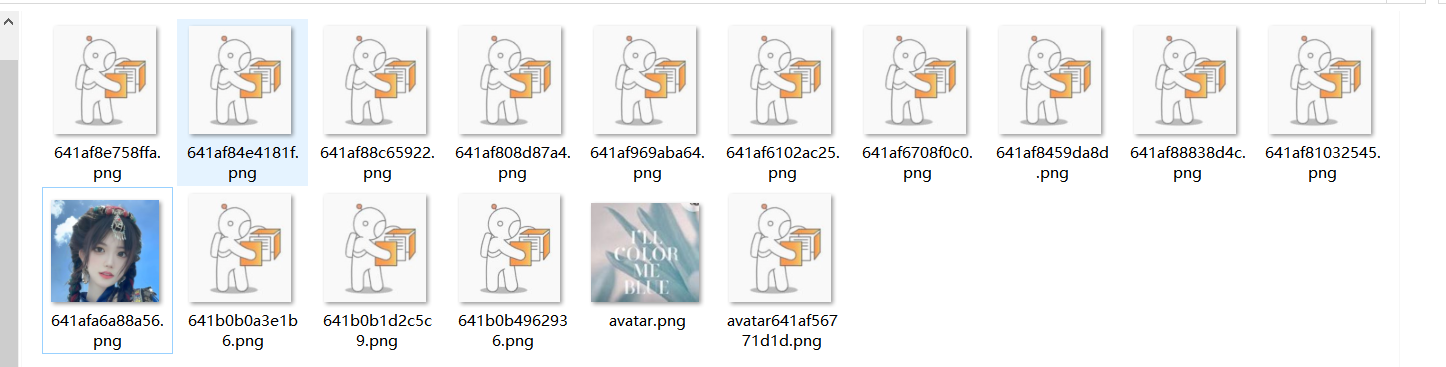
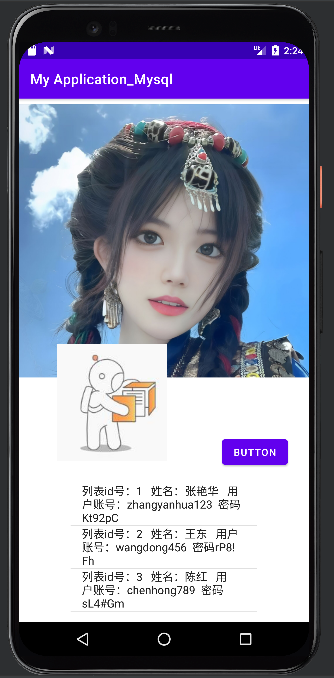
程序运行后,将a.png上传到服务器,保存路径到MySQL中
数据库更新
文件写入
GET从数据库中查询图片路径,到服务器中找到admin 的图片,解析成Base64传回应用程序显示